
RCS Business Messaging

Rich, branded messaging inside the default messaging app.

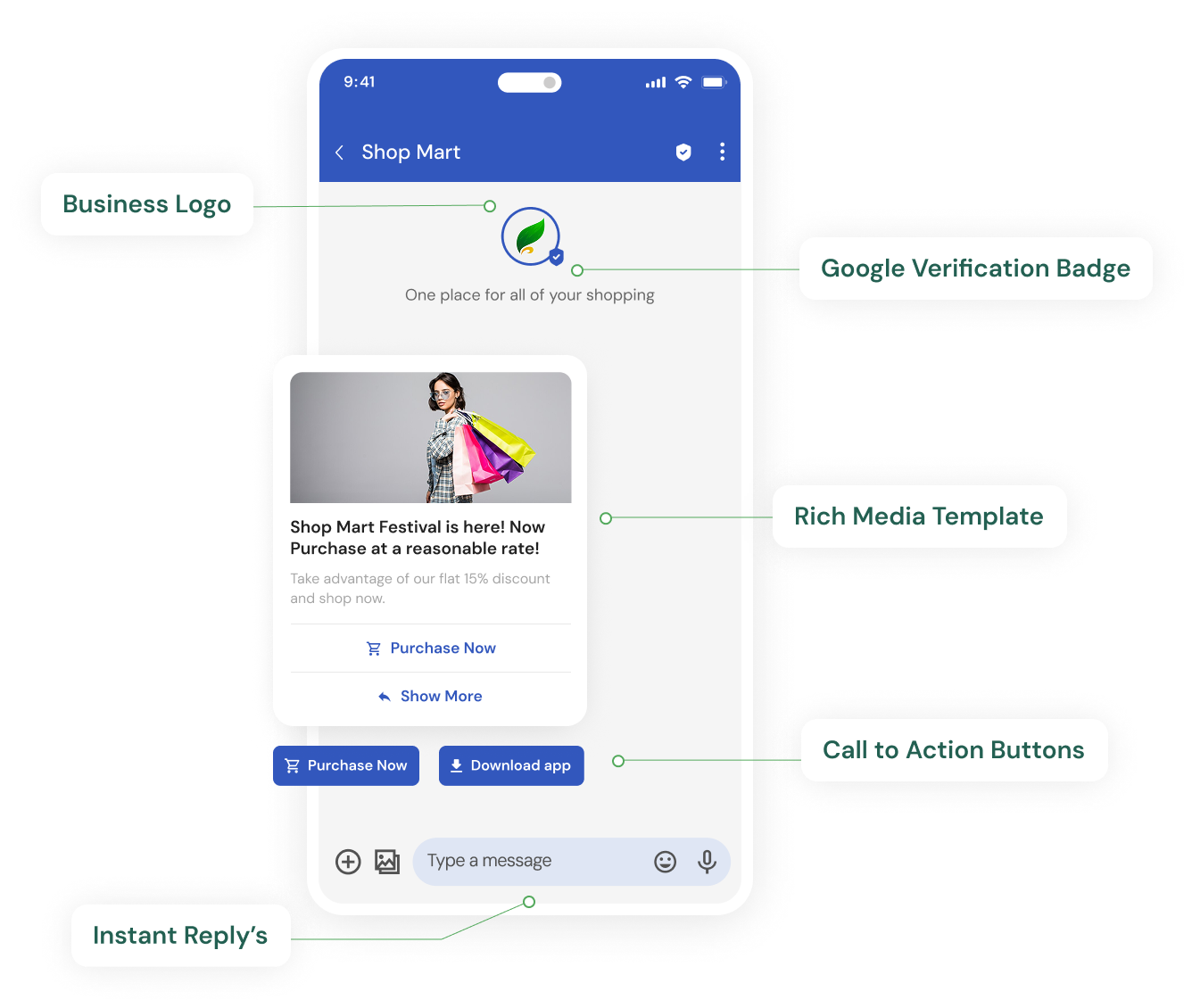
RCS upgrades the messaging inbox with images, carousels, buttons and verified branding. Customers can browse, reply and act without leaving the conversation.

Rich, branded messaging inside the default messaging app.

What is RCS Business Messaging?

RCS Business Messaging (RBM) is the business version of Rich Communication Services, the messaging standard that replaces SMS in the default messaging app on supported Android phones. It lets a business send verified, branded messages with images, carousels, suggested replies and action buttons. Customers see the business name and logo instead of a number, and can interact with the message directly.

The challenge

Plain text limits what a customer can do with your message.

A 160-character SMS can inform, but it cannot show a product, offer a choice or confirm an action. Customers are pushed to a link, a browser and a sign-in before anything happens. Every extra step loses people.

  • Text-only messages cannot show products, tickets or documents.
  • Links out of the inbox add friction and drop-off.
  • Unbranded senders are hard to trust.
  • There is no way to reply with a tap or complete an action in place.
Our approach

Rich cards, carousels and buttons in the inbox customers already use.

RCS lets you send a branded message with a verified sender, an image or video, a short description and buttons such as Track Order, Book Now or Call Us. Customers respond with suggested replies or take action in one tap. Where RCS is not supported on a device, messages can fall back to SMS so no customer is missed.

  • Verified business identity with name, logo and brand colour.
  • Cards and carousels for products, offers and updates.
  • Suggested replies and action buttons for one-tap responses.
  • SMS fallback for devices without RCS.
Key capabilities

Everything you need from RCS Business Messaging.

Rich cards

A single card with image, title, description and action buttons.

Carousels

Swipeable sets of cards for catalogues, options and step-by-step content.

Images and video

Show the product, the ticket or the how-to instead of describing it.

Suggested replies

Pre-set answers so customers respond with a tap.

Action buttons

Open a link, dial a number, share a location or add a calendar event.

Branded experiences

Verified sender name, logo and colours in every conversation.

Interactive content

Guide customers through choices without leaving the inbox.

SMS fallback

Deliver a plain-text version where RCS is unavailable.

Why RCS?

Customers already spend time in their messaging app. RCS lets a business meet them there with content that looks and behaves like a modern app experience, without asking them to install anything. For businesses that rely on SMS today, RCS is the natural next step: the same inbox, a much richer message.

Rich messaging

A rich message combines media, text and actions in one unit. An order update can show the product image, the delivery window and a Track Order button. A promotion can show the collection, the price and a Shop Now button. The customer sees everything at a glance and acts in one tap.

Cards and carousels

Rich cards present one item with an image, title, description and buttons. Carousels group several cards that customers swipe through, which suits product ranges, seat options, plan comparisons and multi-step instructions.

Buttons and suggested replies

Suggested replies let customers answer with a tap: Yes, Reschedule, Talk to support. Action buttons open a URL, start a call, share a location or add an event to the calendar. Both reduce the effort needed to respond and give you structured answers you can act on.

Branded messaging

RCS senders are verified. Your business name, logo, colour and description appear in the conversation header, so customers know the message is genuine. This matters most for financial services, healthcare and any business handling sensitive information.

Interactive experiences

Because customers can reply and act inside the conversation, RCS supports flows that used to need an app or website: confirming an appointment, choosing a delivery slot, browsing a catalogue or answering a short survey.

Benefits

Why businesses choose RCS for the moments that matter.

Higher engagement

Visual, interactive messages give customers more reasons to respond.

Trust through branding

A verified sender with your logo is easier to trust than a number.

Fewer steps to action

Buttons and replies replace copy-paste links and sign-ins.

Works with SMS

Fallback means richer messages where possible and reliable delivery everywhere.

Use cases

Where RCS does its best work.

Order tracking with rich cards

Show product images, delivery status and a Track Order button in one message.

Product catalogues

Present collections as carousels with Shop Now buttons.

Appointment confirmation

Confirm, reschedule or cancel with suggested replies.

Boarding passes and tickets

Deliver QR codes and travel details as a branded card.

Customer surveys

Collect feedback with tap-to-answer replies.

Offers and launches

Announce promotions with images, video and clear calls to action.

How it works

Getting started with RCS Business Messaging

01

Register your brand

We help set up your verified RCS sender with name, logo and description.

02

Design the message

Choose cards, carousels, replies and buttons that fit your use case.

03

Send with fallback

Deliver RCS where supported and SMS everywhere else, and measure engagement.

RCS Business Messaging questions, answered.

Clear answers to the questions we hear most. If yours is not here, ask us directly.

How is RCS different from SMS?

SMS is plain text limited to 160 characters per message. RCS supports images, video, carousels, suggested replies, action buttons and a verified branded sender. RCS needs a supported device and network; SMS works on every phone, which is why RCS messaging is usually paired with SMS fallback.

Do customers need to install an app to receive RCS?

No. RCS messages appear in the default messaging app on supported Android devices. Customers do not install anything.

What happens if a customer's phone does not support RCS?

Messages can fall back to SMS, so the customer still receives the essential information as plain text.

Is the sender verified?

Yes. RCS business senders go through a verification process, and your business name and logo appear in the conversation.

What kinds of buttons can an RCS message include?

Common actions include opening a link, dialling a number, sharing or viewing a location, and adding a calendar event, alongside suggested text replies.

Can RCS be used for transactional messages?

Yes. Order updates, appointment confirmations, boarding passes and account notices all work well as rich cards with relevant actions.

Ready to create richer customer experiences?

Tell us about your RCS requirements and we will recommend the right setup.

Discuss Your Requirement